There is something strange happening in modern software development…
We keep building increasingly sophisticated applications, but somehow, making them run is becoming increasingly complicated.
You need a framework… Then a package manager… Then a dependency manager for the package manager… A database server, a cache server, a queue worker, a build pipeline, a collection of extensions, a dozen environment variables, and occasionally a small sacrifice to the infrastructure gods….
And after all that, you can finally display a page saying “Hello World“.
Congratulations!
But what happens when you just want to install a piece of software on your own hosting account and use it? What happens when your hosting provider doesn’t give you SSH access? When you cannot install system packages? When Redis isn’t available? When ImageMagick is disabled? And why should you need another monthly subscription just to perform a task that should be relatively straightforward?

At ScriptNet Solutions, we’re a small software house. We don’t have an army of developers, dedicated infrastructure teams or unlimited resources. Perhaps that’s precisely why we’ve learned to question things that larger development environments sometimes take for granted.
Our philosophy has gradually become quite simple: Keep It Simple & Standalone.
Not because dependencies are inherently bad. Not because frameworks are useless. And certainly not because reinventing everything is always a good idea. But because every dependency introduces a responsibility, every additional infrastructure requirement creates a potential obstacle, and every unnecessary abstraction has a cost.
Sometimes, the smartest engineering decision is not adding something: it’s removing it.
The Framework Paradox
Let’s start with something that might upset a few developers: our primary development stack is PHP and JavaScript.
Yes, PHP.
That supposedly dead language. The one that has been declared obsolete approximately seventeen thousand times over the last fifteen years. Funny thing is, it still works remarkably well. With PHP handling backend operations and JavaScript taking care of client-side interactions, you can build practically anything required by a modern web application. We deliberately avoid making our products dependent on large frameworks.
Why?
Because we’d rather spend time solving a specific problem than fighting an entire framework because it wasn’t designed to handle that particular requirement. Does this require more work?
Absolutely.
You need to understand what you’re building. You need to pay attention to security, establish consistent architectural rules and make sure every component does exactly what it’s supposed to do. There is no magical framework protecting you from poor engineering decisions. But when you get the architecture right, something interesting happens.
You can build a spaceship with 1,000 carefully designed lines of code instead of assembling a delivery van with wings using 10,000 lines of unnecessary abstraction.
The point isn’t that fewer lines automatically mean better software.
The point is that complexity should exist because it solves a real problem, not because your technology stack introduced it. And here’s another advantage of using a mature language like PHP: an enormous ecosystem of existing libraries.We are not reinventing everything.
We use established tools whenever they make sense. Sometimes we customize them, sometimes we adapt them, and sometimes we develop dedicated components because existing solutions introduce more complexity than they remove.
That’s the difference between choosing a tool and becoming dependent on it.
The Hidden Cost of Something Free
An open-source library might cost absolutely nothing to download.
But that doesn’t mean it’s free.
Every external dependency introduces a relationship that somebody must maintain. Updates, compatibility, security vulnerabilities, abandoned projects, breaking changes and additional infrastructure requirements; and sometimes, the biggest problem isn’t even the library itself. It’s everything required to make that library work.
A relatively simple PDF processing operation might require ImageMagick, specific system packages, additional PHP extensions and server permissions that your hosting provider may not offer.
Suddenly, a straightforward application feature becomes an infrastructure deployment problem.
For a large enterprise with a dedicated DevOps department, this might be perfectly acceptable.
For a small business, an independent developer or somebody running a website on shared hosting?
Not so much.
We don’t believe that every application should require an infrastructure department just to perform its basic functions.
And we certainly don’t believe that users should pay for infrastructure they don’t actually need.
Your Browser Is More Powerful Than You Think
One of the most interesting changes in our development philosophy has been recognizing that the server doesn’t necessarily need to perform every operation. Modern browsers are surprisingly capable environments. Why consume server resources when the user’s browser can perform a task perfectly well? This simple observation has allowed us to remove several mandatory server-side requirements from our products.
PDF previews without mandatory ImageMagick
But if you’ve ever tried to process PDF documents on shared hosting, you’ve probably encountered its security policies.
Many hosting environments restrict PDF processing by default. You might have ImageMagick installed but still be unable to use it for PDF conversion. And enabling the required functionality could mean SSH access, administrative privileges and server configuration changes.
We decided that PDF preview generation shouldn’t depend on all of that.
Dokky uses PDF.js to allow the uploading user’s browser to generate document previews. ImageMagick remains available as an optional tool where the environment supports it.
The difference? A missing server-side dependency no longer prevents the core workflow from functioning.
OCR without outsourcing your documents
Extracting text and metadata from uploaded documents can significantly improve search capabilities and document organization; external OCR services are certainly an option. But they introduce API dependencies, usage restrictions and potentially significant privacy considerations. Do you really want to upload every document to a third-party service just to extract some text?
Dokky uses a self-hosted version of Tesseract.js. The browser performs the OCR processing locally, and the extracted information is sent back to Dokky for storage.
No mandatory server-side OCR installation.
No compulsory external OCR subscription.
And once that metadata is available, other functionalities can build on it: for example, AI-powered document summaries and audio summaries.
TTS: less is sometimes more
We also approached Text-to-Speech differently: we didn’t set out to build another audiobook platform. That’s not the problem we wanted to solve.
Imagine searching through hundreds of documents. Opening every PDF just to understand whether it contains the information you’re looking for is inefficient and very boring.
What if you could understand the content in approximately twenty seconds?
Dokky uses AI through OpenRouter to generate short summaries of up to 200 words, which are then converted into audio and stored locally as MP3 files. The result is available during document searches and can also be used by Forum Autopost.
It’s not about turning every document into an audiobook.
It’s about helping users answer one simple question: “Is this the document I’m looking for?”
And doing so without opening it.
Self-Hosted Doesn’t Mean Expensive-Hosted
This is probably where our philosophy becomes most evident. We believe self-hosted software should mean something different from what the industry has gradually made it become.
Self-hosted shouldn’t mean:
– Buy an expensive VPS.
– Configure SSH access.
– Install Composer and system packages.
– Set up Redis.
– Configure additional services.
– Spend an afternoon resolving server compatibility issues.
And then, perhaps, install the application.
No.
If you need to purchase infrastructure costing as much as a Porsche lease just to run a document management application, something has gone terribly wrong.
We deliberately avoid making tools such as Composer, SSH, Git, Redis or ImageMagick mandatory requirements for Dokky’s core installation.
The installer itself is deliberately simple and boring: three steps.
Step 1 – Environment Check
Dokky checks the essential requirements, including PHP, mod\_rewrite, cURL, PDO and SQLite.
Step 2 – Database Configuration
Enter your MySQL credentials.
Step 3 – Administrator Account
Create your administrator account.
That’s it.
No command-line installation procedure. No dependency compilation. No package manager gymnastics. And we actually tested something that many developers might consider slightly ridiculous. We installed Dokky on InfinityFree…
Yes, that InfinityFree.
One of the most restrictive shared hosting environments you can find. Almost everything worked:
PDF/A-3b publishing, document merging, private groups, forums, AI integration, IPFS, P2P distribution and much more. We did identify an issue with image insertion in Forum comments, apparently related to limitations in that hosting environment.
But the broader experiment demonstrated exactly what we wanted to prove: a properly designed application doesn’t necessarily need an expensive server to deliver sophisticated functionality.
Of course, performance and capacity still depend on available hosting resources; we’re not suggesting that free hosting is suitable for every production workload. But the fact that the platform can operate in such a restricted environment says something about the architecture. Software should adapt to the infrastructure whenever reasonably possible. Not the other way around.
Efficiency Doesn’t Mean Putting Everything in One Box
Here’s another common misconception.
Efficiency doesn’t necessarily mean putting everything inside one centralized system. Sometimes, the opposite is true.
We deliberately separate responsibilities, even when that means maintaining multiple small databases or independent components. Dokky has an extensive caching system, but it doesn’t require Redis. Instead, it uses dedicated SQLite databases for different caching responsibilities.
Why?
Because different components have different workloads, different requirements and different maintenance needs.
Our approach is to keep these responsibilities isolated rather than introduce a centralized service that becomes another mandatory infrastructure requirement. Static assets, audio summaries, QR codes, IPFS gateway URLs, OCR results, cookie consent and general system caching don’t necessarily need to share the same storage mechanism.
Even WebWall, our standalone security product, follows this philosophy with four dedicated SQLite databases.
We don’t believe that putting everything into one database automatically makes an architecture more efficient. Sometimes, separating responsibilities is precisely what makes everything more predictable. And no, you don’t need Redis just because your application has a lot of features; You need a caching strategy that makes sense for your application.
External Services Should Extend, Not Complicate
Are we against external services? Absolutely not.
That would be rather hypocritical.
Some technologies are better handled by dedicated services, and there is no reason to reproduce an entire infrastructure stack inside an application just to avoid using an API. The important thing is how you integrate them.
SneakPeek: external capabilities without mandatory infrastructure
Dokky includes URL-to-PDF functionality through SneakPeek, another ScriptNet product. SneakPeek is a standalone application built around Node.js and Puppeteer Cluster.
Running it independently requires a more capable server environment than running Dokky itself. We could have made Node.js and Puppeteer mandatory requirements for every Dokky installation. But why?
Instead, Dokky communicates with a dedicated SneakPeek endpoint through JWT authentication. When purchasing Dokky, users receive access to a limited free service, allowing up to ten requests per day. Those requiring higher capacity or additional PDF customization can purchase SneakPeek or access a dedicated installation. The functionality is available without forcing every administrator to deploy and maintain additional infrastructure. That’s how we believe external integrations should work: they should extend capabilities, not unnecessarily complicate the installation.
OpenTimestamps: solving a problem without adding another dependency
Another example is Bitcoin OpenTimestamps integration.
We wanted native document timestamping through OpenTimestamps, but we couldn’t find a suitable PHP implementation for the workflow we needed. Rather than introducing another mandatory runtime dependency, we implemented a dedicated integration through SneakPeek.
Dokky can request cryptographic timestamping of document hashes, receive the initial proof and subsequently retrieve the completed proof once the corresponding Bitcoin transaction has been confirmed. The document itself doesn’t need to be transferred to the external service. Only the cryptographic hash is required for the timestamping operation.
It’s another example of a simple principle: When an external capability is necessary, isolate it behind a clearly defined interface. Don’t make the entire application dependent on its internal implementation.
Modular Software. Modular Experiences
Now we get to something that, in our opinion, is just as important as reducing technical dependencies.
Modularity shouldn’t stop at the source-code level. It should extend to how people actually use the product. A platform with dozens of features shouldn’t force administrators to enable and use all of them.
Why should it?
Imagine three completely different scenario.
A company looking for a private document portal.
It needs document management, private groups, PDF publishing, WebWall and OpenTimestamps.
It doesn’t need public registrations or a community forum.
A community of people sharing recipes.
They want document publishing, a forum, AI assistance, IPFS and P2P distribution.
They don’t necessarily care about all the other document-management capabilities.
A group of football supporters.
They simply want a community where friends can discuss matches, players and everything happening every Sunday.
They can disable the document-related functionality and use Dokky essentially as a forum platform with a funny AI Powered User.
Same installation. Different configurations. No need to maintain three separate products.
The Anti-Panic configuration
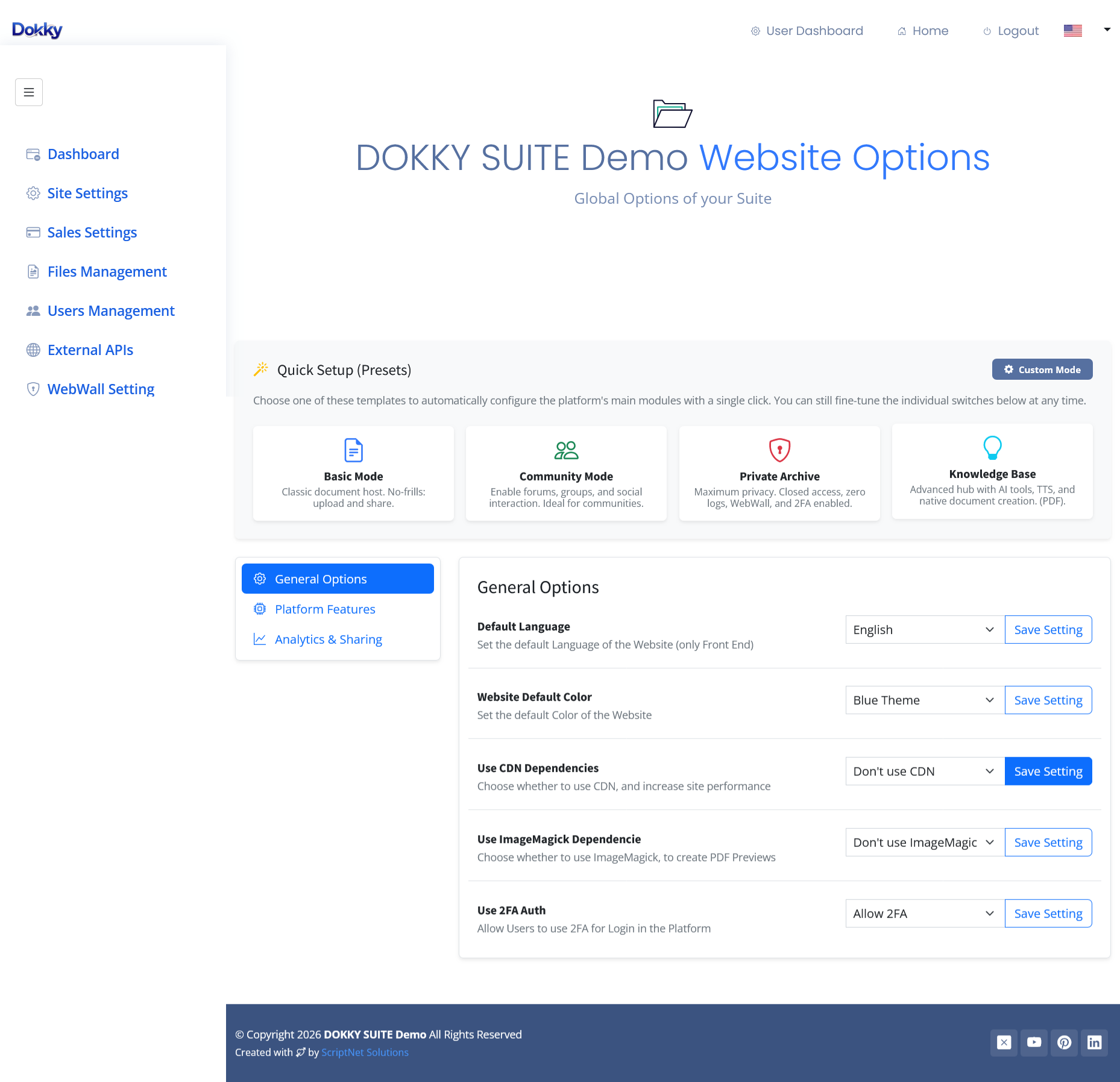
Of course, giving administrators dozens of independent configuration options can become intimidating.
That’s why Dokky includes an initial configuration interface with predefined usage presets.
Instead of presenting an inexperienced administrator with a wall of switches and configuration options, we offer macro-configurations designed around common use cases.
– Choose the intended usage.
– Apply the preset.
The relevant functionality is configured automatically. And if you want to customize everything later, you can.
We like to call this the Anti-Panic approach. Complexity should be available when needed, not imposed during installation: You shouldn’t have to understand every feature of a platform just to start using the three features you actually need. This is what functional modularity means to us.
Independent components internally, independent functionality externally. A module can be enabled or disabled according to the needs of the installation; the platform adapts to the user, not the other way around.
We Don’t Sell Infrastructure. We Sell the Result
After all these examples, we should probably clarify something:
We aren’t trying to eliminate every external library.
We use established libraries such as PDF.js, SweetAlert, Sortable.js and others whenever they provide real value.
We integrate external services when they make technical and economic sense.
We use AI providers, IPFS providers and specialized services when they solve problems more effectively than building everything ourselves. The objective isn’t ideological purity: it’s engineering pragmatism.
We want to build software that:
- Doesn’t require unnecessarily expensive infrastructure
- Doesn’t force users into recurring subscriptions for basic capabilities
- Doesn’t require advanced server administration just to get started
- Keeps user data under the control of the people who own it
- Uses external services only when they provide a genuine advantage
- Remains modular, maintainable and adaptable
And most importantly, we want users to spend their time using software rather than maintaining the infrastructure required to run it. There is nothing wrong with powerful frameworks, sophisticated server environments or large cloud infrastructures. But they should be choices, not automatic prerequisites.
– A small business should be able to install a document management platform without hiring a DevOps engineer.
– An independent developer should be able to deploy an application without first assembling an infrastructure ecosystem.
– An organization should be able to own its software environment without becoming dependent on an endless collection of SaaS subscriptions.
That’s why we keep questioning dependencies. That’s why we keep removing unnecessary requirements. And that’s why we keep investing in modular architecture. Keep It Simple & Standalone.
Not because simplicity means doing less; but because good engineering means making complicated things work without making them complicated for everyone else.
So, why bother building everything yourself?
Well, you don’t have to.
You could spend months developing a document management platform, implementing PDF publishing, building private collaboration tools, integrating AI, configuring decentralized storage, developing security mechanisms and creating a complete community system.
You could also spend another few months maintaining all of it.
Or…
You could simply use something that already exists.
Dokky Suite brings document management, publishing, collaboration, security, AI and decentralized distribution together in one modular, self-hosted platform.
Configure what you need. Disable what you don’t. Keep control of your installation and your data.
No unnecessary infrastructure. No mandatory SaaS subscriptions. No need to reinvent the wheel.
And if you don’t feel like spending your weekends building and maintaining all of this…
Why bother building it when it’s already done? Get Dokky.
ScriptNet Solutions · Keep It Simple & Standalone.
Discover Dokky Suite – Live Demo
Get now Dokky Script – 20% Off