WebWall 2.3, Venkman Edition, takes a wider look at that problem.
This release introduces a new analysis engine for low-and-slow distributed activity, improves the way WebWall evaluates system pressure, and strengthens the connection between local detection and Cloudflare native enforcement. It also makes those decisions easier to follow, with a more informative dashboard, recent suspicious-path events, and an IP investigation view that brings activity, scoring, and enforcement history together.
The theme is context: understanding not just what a request looks like, but how it fits into everything happening around it.
The Attack That Does Not Look Like a Spike
Traditional per-IP scoring answers an important question:
“What has this visitor been doing?”
If an address repeatedly probes sensitive paths or sends suspicious payloads, its history gives WebWall something concrete to act on.
But distributed activity changes the shape of the problem.
Instead of one client making hundreds of requests, many clients can make only a handful each. Individual scores remain modest while the combined activity creates persistent pressure.
WebWall 2.3 adds another question:
“What are these visitors doing together?”
The new subnet analysis engine examines a rolling three-hour traffic window, looking for patterns across network ranges rather than treating every address as an unrelated visitor. A pool of addresses producing relatively little activity per IP can now become visible as a collective pattern. This is not a replacement for individual scoring. It is the missing perspective between a single visitor and the overall traffic graph.
A Shared Network Is a Clue, Not a Conviction
Grouping addresses is only the beginning.
A mobile network can produce traffic from many legitimate users. A hosting network can carry both ordinary applications and automated abuse. A recognized crawler should not be treated like an unknown client simply because it is busy.
WebWall therefore combines subnet behavior with network classification.
The new ASN reference data, supported by Team Cymru DNS lookups, helps identify the network behind an address. WebWall then applies its own classification and risk weighting:
– Hosting and suspicious proxy classifications increase the weight of suspicious behavior.
– ISP and mobile classifications receive a substantial reduction.
– CDN-classified traffic receives a lower weighting.
– Recognized good-bot networks are excluded from this analysis.
The important distinction is that network identity provides context, not an automatic guilty verdict.
WebWall is not designed to ban a provider because it is a provider. It uses network information to interpret the activity it has actually observed. That matters just as much when traffic is legitimate as when it is hostile. A protection system that cannot tell the difference between “many visitors” and “many suspicious visitors” can easily become its own availability problem.
Investigate in the Background. React on the Next Request
A broader view should not require a full historical investigation every time someone opens a page.
WebWall separates immediate request handling from deeper analysis. The request-time tracker performs local checks, inspects suspicious input, consults cached information, and records activity for background processing.
The background engine consolidates those events, updates scores, evaluates system pressure, and runs subnet analysis.
When that analysis flags a network, it publishes the result to a cache that subsequent request checks can use.
The loop is straightforward:
1. Observe incoming activity.
2. Analyze the accumulated pattern.
3. Update local intelligence.
4. Use that intelligence when the next request arrives.
5. Escalate when the evidence reaches the relevant threshold.
The next request no longer has to be assessed without the benefit of what the previous thousand revealed.
Meanwhile, score decay reduces the influence of older activity over time, allowing the system’s assessment to evolve rather than simply accumulating suspicion forever.
From “Something Is Happening” to “Here Is What Is Happening”
Detection is only half the experience.
The other half is opening the dashboard and understanding the situation without assembling it from several logs and database queries.
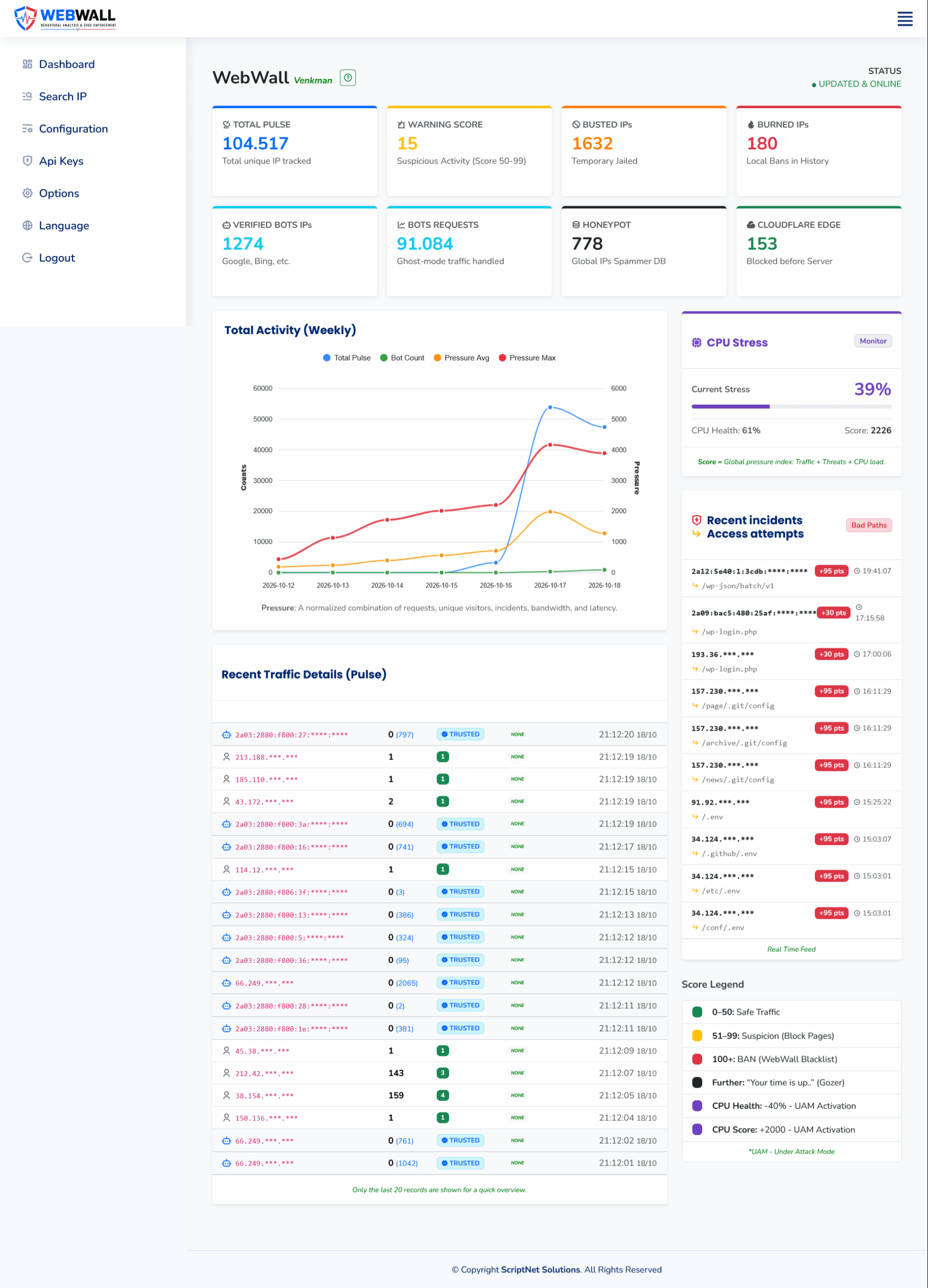
The updated WebWall dashboard brings together traffic totals, verified-bot activity, local enforcement counters, Cloudflare edge activity, and a weekly chart showing traffic alongside pressure trends. A dedicated CPU Stress panel puts the server-health signal within the same operational view.
That arrangement helps separate questions that are easy to confuse:
– Is traffic increasing?
– Is suspicious activity increasing?
– Is the server losing processing headroom?
– What protective actions are already in place?
Those are related questions, but they are not interchangeable.
A higher traffic count alone does not explain whether the application is dealing with legitimate visitors, recognized automation, repeated probing, or a mixture of all three.
The dashboard gives those signals somewhere to meet.
Recent incidents, without the log hunt
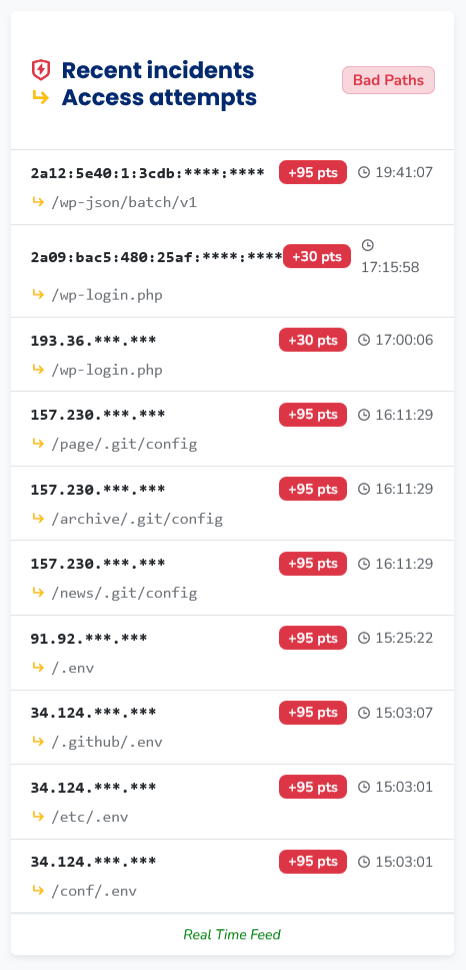
The recent-incidents panel surfaces suspicious path attempts directly beside the main activity view.
In the example shown, requests include WordPress login paths, exposed Git configuration paths, and environment-file locations. Each entry displays the requested path, a masked source address, a timestamp, and the associated score contribution. That turns a general warning into something an administrator can inspect.
Instead of seeing only that “suspicious activity increased,” you can see what clients were actually trying to reach, and how WebWall scored those attempts.
An IP Address Should Come with a Story
Once a particular address needs attention, the next step should not feel like starting the investigation from scratch.
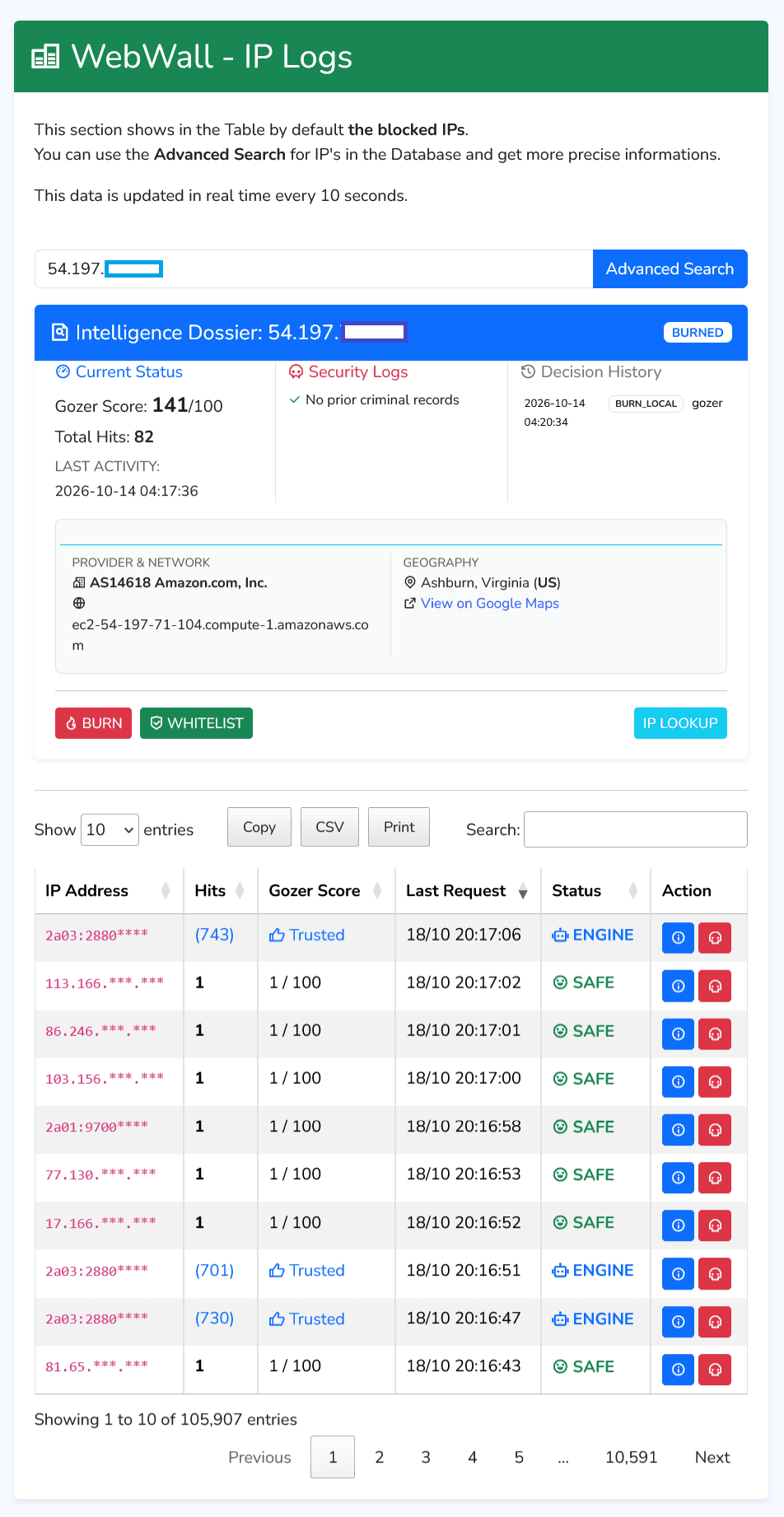
The IP search view brings the relevant information into a single dossier: current status, accumulated score, total hits, last activity, available security logs, decision history, and provider and network information. The surrounding interface provides quick enforcement and whitelist controls, while the activity table refreshes every ten seconds.
This makes the workflow more direct:
Find the address. Review its history. Understand its current state. Take action if necessary.
In the example dossier, the selected address has a score of 141 against a local enforcement threshold of 100, a recorded total of 82 hits, and a local enforcement decision in its history. Those details sit together rather than requiring the administrator to reconstruct the sequence from separate screens. The distinction matters because a score alone rarely answers every operational question:
– Was this address already handled?
– When was it last active?
– Which network does it belong to?
– Is there a recorded decision?
The investigation view gives those questions a shared home.
Local Detection, Edge Enforcement
WebWall observes behavior inside the application’s security flow. Cloudflare provides a place to enforce selected decisions before matching traffic reaches that application.
Version 2.3 extends that connection with support for escalating confirmed malicious network ranges alongside individual IP addresses.
Both can be submitted to the same custom IP list used by the WebWall Cloudflare rule.
That becomes particularly useful when an abusive pattern keeps moving between addresses inside the same network. If the evidence supports a subnet-level response, the enforcement target can represent that subnet rather than chasing every address separately.
But a wider target also demands stronger justification.
Range-level enforcement potentially affects more clients than an individual-IP action. The classification and confidence logic therefore matters as much as the ability to submit the range.
The feature is not “block more addresses with fewer clicks.”
It is “respond at the scope the evidence supports.”
What the Cloudflare Screenshot Actually Shows

The example Cloudflare view contains two distinct challenge rules worth separating.
The WebWall rule references the `$webwall` list and explicitly excludes Cloudflare-verified bots. In the displayed view, it has approximately 46.27 thousand events and a Challenge Success Rate of 0.28%.
That is a useful operational observation: few of the recorded challenges were successfully completed. It is not, on its own, a complete measure of detection accuracy or false positives. Above it sits an example of a separate manually configured rule covering two IPv6 ranges. That rule shows approximately 1.49 million events and a displayed CSR of 0%. Those events belong to the operator’s policy rule—not to WebWall’s automated detections.
This separation reflects an intentional boundary:
– Behavioral detection asks whether observed activity justifies intervention.
– Operator policy decides whether particular infrastructure is welcome at all.
An administrator can choose to challenge traffic from a network even when WebWall’s behavioral assessment would not independently classify it as malicious.
Keeping those decisions separate makes both the automation and the reporting more honest.
Protection That Knows When to Step Back
The release also improves how WebWall decides when broader Cloudflare protection is appropriate.
The pressure assessment combines traffic activity, security incidents, and a server-health signal. The revised CPU stress logic compares a small SHA-256 workload with a stored baseline to help estimate changes in available processing capacity.
That measurement is a signal, not a diagnosis. Reduced headroom does not automatically mean an attack is responsible.
WebWall evaluates it alongside the rest of the activity, while subnet confidence and network classification help avoid interpreting legitimate distributed traffic as sufficient reason for escalation.
When the configured pressure or sustained-distress conditions are met, WebWall can enable Cloudflare Under Attack Mode. When conditions stabilize, it returns the configured security level to Medium. The aim is not to keep the site in a permanent defensive posture.
It is to apply additional protection when the evidence calls for it, and release it when those conditions pass.
The Work Behind the Headline Feature
Low-and-slow analysis is the most visible architectural addition, but version 2.3 also improves the systems around it:
- Refactored request tracking and optimized background decision flow
- Revised CPU stress balancing and Cloudflare activation scoring
- Dedicated storage for low-and-slow analysis metrics
- Updated SQLite indexes
- Improved scheduled-maintenance capabilities and execution flow
- Stronger `.htaccess` path shielding with additional security headers
- Updated frontend translations and the precompiled privacy-policy page
- Minor interface fixes
These changes support different parts of the same job: collecting useful evidence, processing it efficiently, making proportionate decisions, and showing the administrator what happened.
A Wider View of Application Security
WebWall 2.3 does not assume that every attack arrives as an obvious spike, or that every spike is an attack. It connects individual requests with visitor history, subnet behavior, network context, server health, and edge enforcement.
There are limits. Subnet analysis is most useful when suspicious activity shares a network-level pattern. A campaign distributed across unrelated networks may not produce the same signal, and ASN classification cannot establish intent by itself.
But the direction is clear. When a hundred quiet visitors are part of the same problem, looking at them one at a time is no longer enough.
Venkman Edition gives WebWall a wider view—and gives the person running it a clearer one.